 VECTOR STUDIOS
Vector Studios checklist: pick Weights and Biases or MLflow for teams

MLflow suits teams that need self-hosting, tight data control and budget-conscious production workflows, while Weights and Biases suits teams that want fast onboarding, polished collaboration and visual experiment analysis. The real decision is time versus money: Weights and Biases costs more per user but saves engineering hours, and MLflow costs less in licensing but demands more operational effort. The checklist below helps you work out which trade-off fits your team.
- Teams with strict data residency or high DevOps capacity should favor MLflow for its self-hosting and cost-effective infrastructure control.
- Teams prioritizing rapid onboarding and collaborative reporting benefit from Weights and Biases, which simplifies setup and enhances shareability.
- Heavier hyperparameter searches and frequent experimentation workflows are better served by Weights and Biases’ built-in sweep and system telemetry features.
- Migration to production necessitates planning for artifact storage, system telemetry fidelity, and ongoing infrastructure management, influencing the tool choice.
- Conducting a short trial measuring discovery time and maintenance effort helps determine which tool aligns best with team size, budget, and operational capacity.
Vector Studios helps teams develop custom AI solutions, integrate them into existing infrastructure, and maintain them reliably over time.
Explore AI Solutions →Table of Contents
- What actually differs: architecture, workflows and data
- Where Weights and Biases wins decisively
- Where MLflow wins decisively
- Decision factors: a single checklist to pick between them
- Deployment and scaling considerations
- A practitioner’s perspective from Vector Studios
- Control versus convenience: how to actually think about this
- How Vector Studios can help teams choose and integrate tracking
- FAQ
- Sources
What actually differs: architecture, workflows and data
The two tools start from opposite design philosophies. MLflow is open source and self-hostable, built around a tracking server, a model registry and deployment packaging that you can run entirely on your own infrastructure. Weights and Biases is SaaS-first, built around rich telemetry, hosted dashboards and a workspace model designed for sharing results across a team without anyone configuring a server.
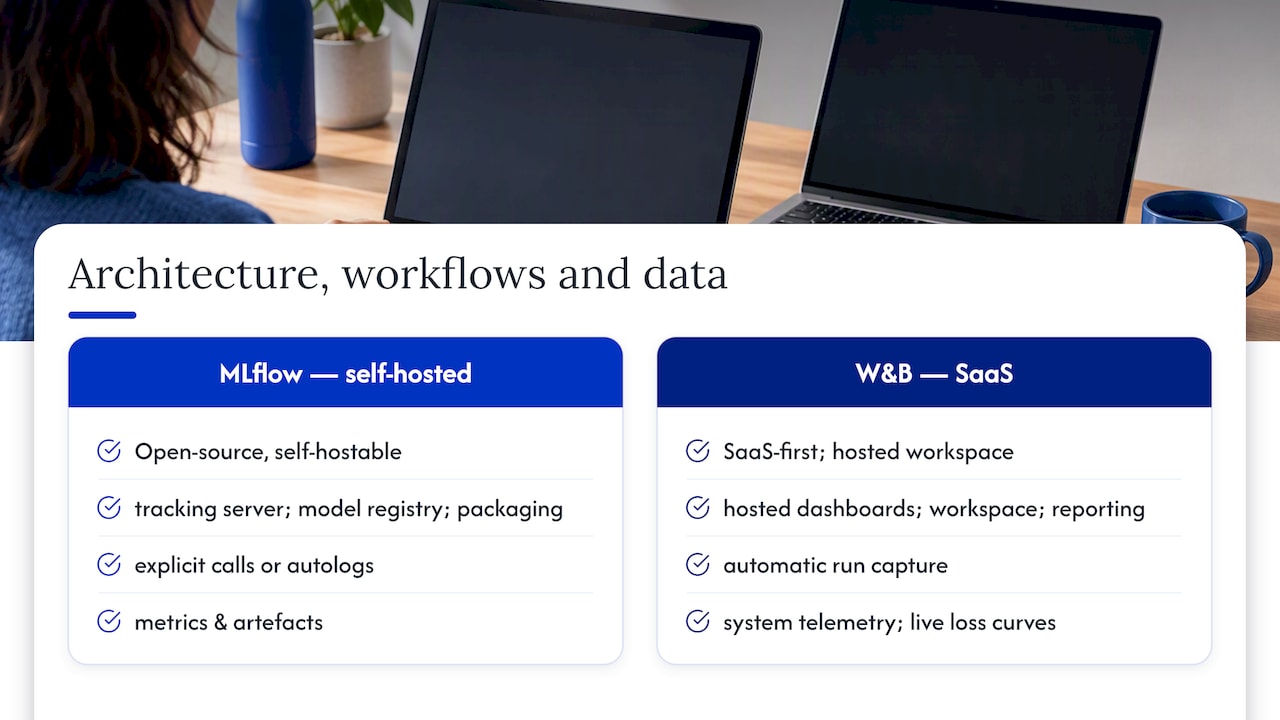
That difference shapes daily workflows. MLflow logs metrics and artefacts through explicit calls or autolog integrations for frameworks such as PyTorch and TensorFlow, and it plugs naturally into Databricks pipelines. Weights and Biases captures a similar range of metrics but adds automatic system telemetry, live loss curves and a reporting layer designed for people who were not in the room when the run happened.
The practical consequence is where your data lives and who maintains the plumbing. A self-hosted MLflow server keeps everything on infrastructure you control, which matters for data residency and compliance, but someone has to run that server. A Weights and Biases account gets you a first logged run in minutes, at the cost of sending training metadata to a third-party platform.
Where Weights and Biases wins decisively
Weights and Biases earns its subscription fee in scenarios where speed of collaboration matters more than infrastructure control. Teams report a first logged run within minutes of installing the library, and the built-in reporting layer turns raw metrics into shareable links that non-technical stakeholders can actually read.
- Onboarding speed: new team members can log and share a first run without configuring a server.
- Collaborative reports: shareable links and comments replace screenshots and Slack threads.
- Built-in sweeps: hyperparameter search is configured in a few lines rather than assembled from separate tools.
- System telemetry: GPU, CPU and memory metrics are captured automatically rather than instrumented by hand.
These features matter because they cut discovery time. A researcher who can glance at a shared dashboard rather than ask a colleague to export logs saves real hours over a project, and practitioner cost-benefit analyses suggest that teams of three or more frequently find the subscription pays for itself once that saved time is counted.
Where MLflow wins decisively
MLflow wins when control and cost structure matter more than onboarding speed. Because it runs on infrastructure you own, teams with strict data residency rules or an aversion to sending experiment metadata offsite keep everything in-house.
- Self-hosting: tracking server, artefact store and registry all run on your own infrastructure.
- Model registry maturity: MLflow’s registry is built for production handoff, not just experiment comparison.
- Databricks affinity: teams already on Databricks get tighter integration with minimal extra setup.
- Cost structure: you pay in infrastructure and operations time rather than per-user subscription fees.
That cost structure is the crux of the decision. Weights and Biases shifts the bill to a predictable subscription; MLflow shifts it to your own compute and the engineering hours needed to run and maintain a server. For a team with spare DevOps capacity and a strict budget ceiling, that trade favours MLflow. For a lean team without anyone free to own server maintenance, it often does not.
Decision factors: a single checklist to pick between them
Rather than treating this as a feature war, run through the factors that actually determine which tool fits your situation.
- Team size: small or solo teams rarely need the collaboration layer that justifies a per-user fee.
- Budget model: decide whether you would rather pay a predictable subscription or absorb variable infrastructure and ops costs.
- DevOps capacity: self-hosting MLflow well requires someone who can own auth, backups and upgrades.
- Compliance needs: strict data residency rules usually point towards self-hosting.
- Sweep frequency: heavy hyperparameter search workloads favour the built-in sweep tooling in Weights and Biases.
A useful heuristic: trial Weights and Biases first when your team is three or more people and collaboration is the bottleneck. Mandate MLflow when compliance or budget constraints are non-negotiable regardless of team size.
Whichever you trial, measure two things over a month: time-to-insight (how long it takes a new team member to find and understand a past run) and maintenance cost (hours spent keeping the tracker running). Those two numbers usually settle the argument faster than a feature comparison.
Deployment and scaling considerations
Moving either tool from a single laptop to a production team surfaces a different set of problems, unlike day-one experimentation.
- Artefact storage: large model checkpoints and datasets need a retention policy early, or storage and bandwidth costs creep up quietly.
- GPU telemetry: Weights and Biases captures system metrics with more fidelity out of the box, which helps when debugging a slow or stalled training run.
- Integrations: both tools connect into Kubernetes-based training jobs, Databricks pipelines and CI/CD workflows, though the depth of that integration varies by stack.
- Self-hosting overhead: running MLflow in production means owning authentication, backups and version upgrades, which is a real and ongoing commitment rather than a one-off setup task.
Operationalising models typically requires extra tooling beyond experiment tracking as projects scale, including orchestration and monitoring layers that neither tool was built to replace. A sensible pattern many teams adopt is hybrid: Weights and Biases for active research and MLflow or a dedicated registry for the production artefacts that need strict provenance.
A practitioner’s perspective from Vector Studios
In our experience with various AI projects, we have learned to treat experiment tracking as infrastructure, not an afterthought. Our orchestration platform, JARVIS, coordinates multiple AI agents across a project, and the tracking layer underneath has to keep pace with both rapid prototyping and the production controls a client eventually needs.
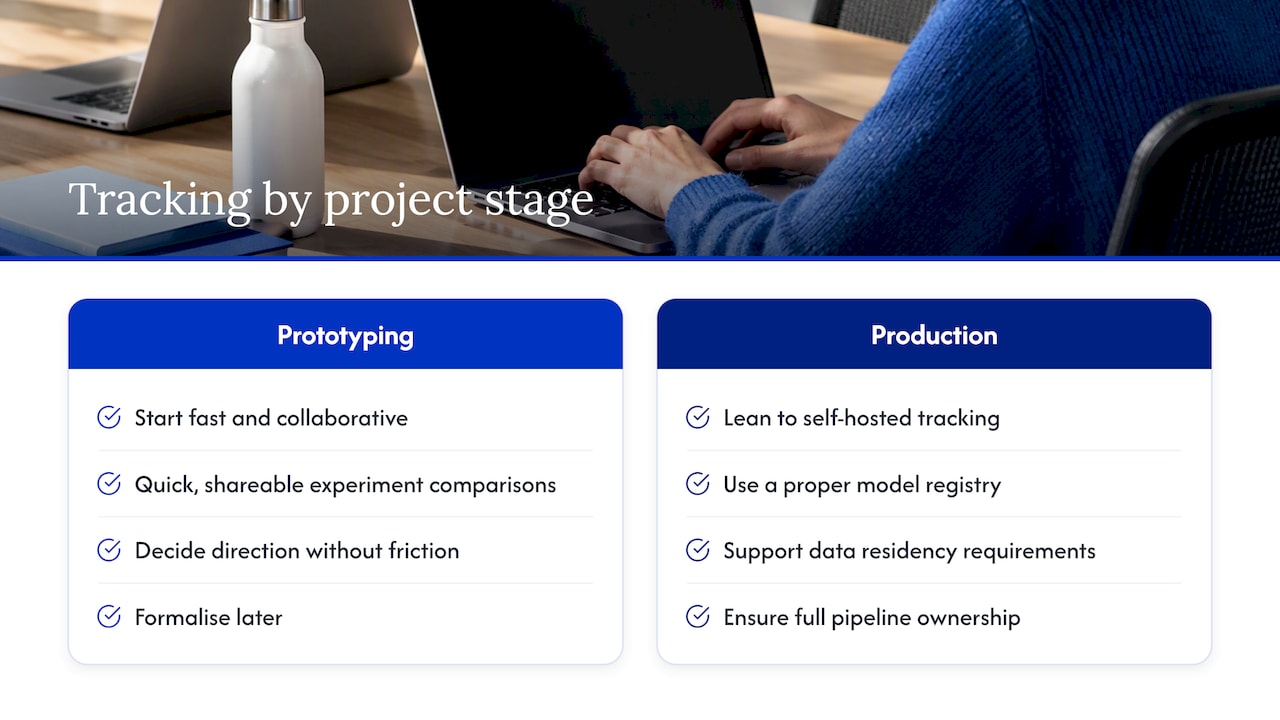
Our default on most engagements is to start fast and collaborative, then formalise. Early prototyping favours quick, shareable experiment comparisons so a team can decide direction without friction. Once a model heads towards deployment, we lean towards self-hosted tracking and a proper registry, particularly where a client has its own data residency requirements or wants full ownership of the pipeline we hand over.
Control versus convenience: how to actually think about this
The honest answer is that neither tool is wrong, only mismatched to a stage. Trial both on a real project before committing, and do not be afraid of a hybrid setup once you reach production. A 30-day checklist: pick one active project, log it in both tools, measure onboarding time and maintenance effort, then decide.
How Vector Studios can help teams choose and integrate tracking
Choosing between experiment trackers is only one decision inside a much bigger build, and we help teams make that call as part of the wider engineering work rather than as an isolated tooling exercise.

- AI Strategy & Consulting: we help you weigh control against convenience for your specific project and team.
- Custom Model Development: we build and integrate the models your tracking setup needs to support.
- AI Integration & Automation: we connect tracking, registries and deployment pipelines into one working system.
- Ongoing AI Support: we stay on to maintain and adjust the setup as your team grows.
If you want a second opinion on your current setup or help to integrate either tool into a production pipeline, get in touch through our AI strategy and integration services.
FAQ
No single tool is universally better than MLflow. Weights and Biases is the common alternative for teams that prioritise fast onboarding and collaboration over self-hosting, while enterprise pipelines sometimes need a broader MLOps toolset alongside either tracker.
No. MLflow is one tool within the broader MLOps discipline, specifically focused on experiment tracking, model packaging and registry. Production deployment typically requires additional orchestration and infrastructure tooling beyond what any single tracker provides.
Yes, experiment tracking is a core feature of MLflow, alongside model packaging and a registry for production handoff. You can self-host the tracking server or use a managed version depending on your infrastructure preference.
The two solve different problems: MLflow focuses on experiment tracking and model registry, while Kubeflow is a broader pipeline orchestration platform built on Kubernetes. An empirical evaluation of modern MLOps frameworks positions MLflow among lightweight, easy-to-adopt tools and suggests broader platforms suit larger enterprise pipelines.